

Qwen Image Task Retrieval API Integration Guide
The Qwen Image Task Retrieval API is used to obtain the execution results of image generation or editing tasks, supporting single-task retrieval and batch retrieval. Through it, you can obtain the final images after asynchronously submitting generation requests, and you can also reread the results of completed tasks.
The endpoint is POST https://api.acedata.cloud/qwen-image/tasks. Task retrieval does not incur additional API consumption, and generation costs are still settled by the original generation task.
¶ Application and Usage
- Open the jiasmart Console, log in or register, then create or select an application to obtain an API Token.
- Users who have already called the Qwen Image generation and editing API can continue using the same Token, without separately applying for task retrieval credentials; please confirm that the credentials have permission to call the corresponding API.
- If you do not yet have a generation task, first submit a request according to the Qwen Image Generation and Editing API Integration Guide, and save the
task_idin the response.
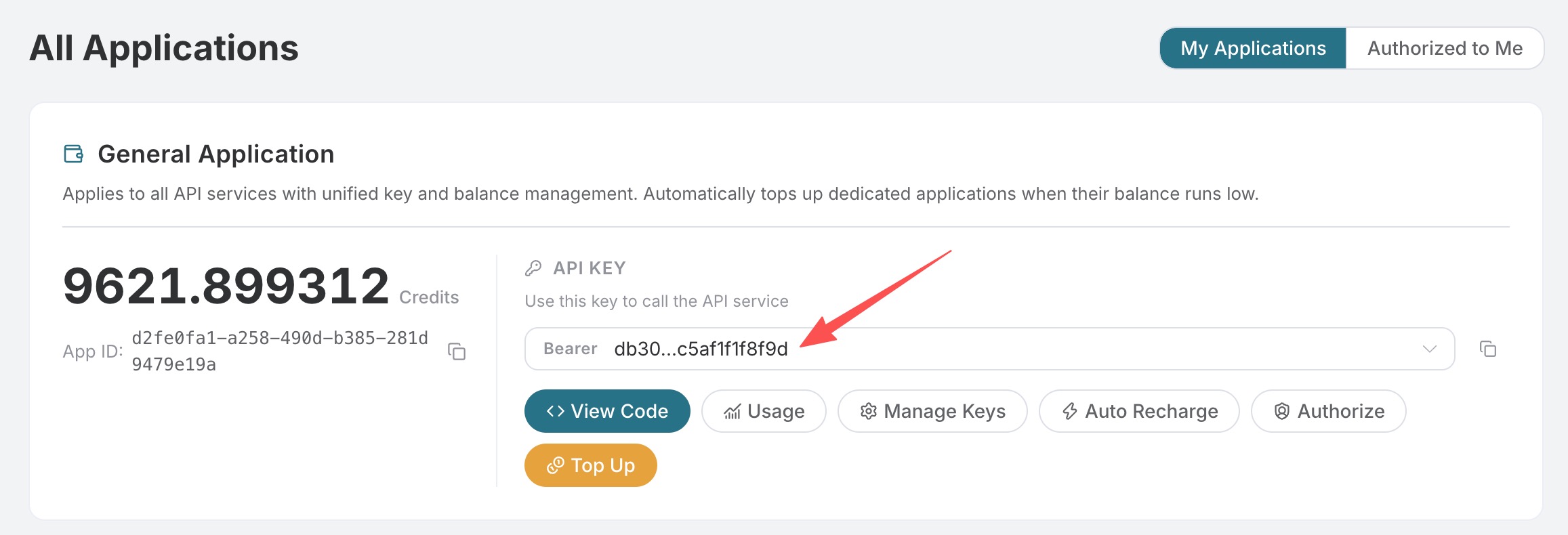
YOUR_API_TOKEN below needs to be replaced with the Token obtained from the console, and YOUR_TASK_ID needs to be replaced with the task ID returned by your own generation request. The Token should be stored on the server side and must not be placed in public code. Generation requires available credits, which can be topped up on the Balance page.
Complete parameters and online debugging: Qwen Image Task Retrieval API.
¶ Obtain a Task ID
Set async: true in the image generation request, and the API will first return a task_id, without needing to keep the connection open while waiting for image generation to finish. For example:
curl -X POST 'https://api.acedata.cloud/qwen-image/images' \
  -H 'Authorization: Bearer YOUR_API_TOKEN' \
  -H 'Content-Type: application/json' \
  -H 'Accept: application/json' \
  -d '{
    "model": "qwen-image-3.0",
    "prompt": "A simple red circle centered on a clean white background.",
    "size": "1024*1024",
    "n": 1,
    "async": true
  }'
The parameter name for the task retrieval request is id, and its value is the task_id returned by the generation API. Do not use an image URL or trace_id in place of the task ID, and do not directly copy the historical task IDs from the response examples in this document.
¶ Request Headers and Request Parameters
| Request Header | Value | Description |
|---|---|---|
Authorization |
Bearer YOUR_API_TOKEN |
API Token; retain the space after Bearer |
Content-Type |
application/json |
The request body uses JSON format |
Accept |
application/json |
Receives responses in JSON format |
| Parameter | Type | Usage |
|---|---|---|
action |
string | retrieve retrieves a single task, retrieve_batch retrieves in batches; default is retrieve |
id |
string | For single-task retrieval, enter the task_id returned by the generation API |
ids |
string[] | For batch retrieval, enter an array of task IDs |
¶ Retrieve a Single Task
¶ cURL
curl -X POST 'https://api.acedata.cloud/qwen-image/tasks' \
  -H 'Authorization: Bearer YOUR_API_TOKEN' \
  -H 'Content-Type: application/json' \
  -H 'Accept: application/json' \
  -d '{
    "action": "retrieve",
    "id": "YOUR_TASK_ID"
  }'
¶ Python
First run pip install requests to install the dependency, and set ACEDATACLOUD_API_TOKEN and QWEN_IMAGE_TASK_ID in the runtime environment, filling in your Token and task ID respectively.
import os

import requests

response = requests.post(
    "https://api.acedata.cloud/qwen-image/tasks",
    headers={
        "Authorization": f"Bearer {os.environ['ACEDATACLOUD_API_TOKEN']}",
        "Content-Type": "application/json",
        "Accept": "application/json",
    },
    json={"action": "retrieve", "id": os.environ["QWEN_IMAGE_TASK_ID"]},
    timeout=60,
)
response.raise_for_status()
task = response.json()
print(task)
¶ Response Example and Field Descriptions
The following is an excerpt of the main fields from a real completed task. The image uses a public example URL of the same image, and the cost is only used to illustrate the response format:
{
  "id": "565a7f55-72c6-43ed-b274-268ff046e5b4",
  "created_at": 1787658940.912,
  "started_at": 1787658940.911,
  "finished_at": 1787658951.254,
  "elapsed": 10.343,
  "response": {
    "success": true,
    "task_id": "565a7f55-72c6-43ed-b274-268ff046e5b4",
    "trace_id": "bb923cec-1550-43b4-8df2-288ac0977b4b",
    "data": [
      {
        "image_url": "https://cdn.acedata.cloud/assets/examples/qwen-image/40d5c76b-2f84-4b04-9ea0-b706417ae622-bac6a9e9de22.png"
      }
    ],
    "usage": {
      "input_image_count": 0,
      "output_image_count": 1,
      "output_width": 1024,
      "output_height": 1024
    },
    "cost": {
      "amount": 0.322,
      "currency": "credit",
      "list_amount": 0.35
    }
  }
}
| Field | Description |
|---|---|
id |
The task ID, corresponding to the task_id returned by the generation API |
request |
Parameters recorded in the original generation request; not shown in the excerpt above |
created_at |
Task creation time, Unix timestamp, in seconds |
started_at |
Processing start time, Unix timestamp, in seconds |
finished_at |
Processing completion time, in seconds; may not be returned or may be empty if not completed |
elapsed |
Processing duration, in seconds, may include decimals; may not be returned or may be empty if not completed |
response |
Final response of the original generation task; this field may not yet exist while processing |
response.success |
Whether the original generation task succeeded |
response.data |
List of successfully generated images; obtain images from the image_url in each item |
response.usage |
Usage such as the actual number of input reference images, number of output images, and dimensions |
response.cost |
Cost information for the original generation task; currency: "credit" indicates Credits |
response.error |
Error code and information when the original generation task fails |
response.trace_id |
Tracking ID of the original generation request; retain it when troubleshooting |
The retrieval returns a task record, so the image URL is located at response.data[].image_url, which differs from the data[].image_url path directly returned by the generation API. A successful retrieval HTTP request does not mean that generation has succeeded; you need to continue checking whether the task is complete and response.success.
¶ Poll Until the Task Is Complete
A task may still be processing immediately after submission, and no final response may yet exist. When no matching record is found, single-task retrieval returns an empty object {}. First verify the task ID and credentials; if the task was just submitted, retry later and set a total waiting limit.
The Python example below uses the same environment variables, queries once every 5 seconds, and waits for up to 10 minutes. It handles processing, successful generation, failed generation, and timeout separately:
import os
import time

import requests

task_id = os.environ["QWEN_IMAGE_TASK_ID"]
headers = {
    "Authorization": f"Bearer {os.environ['ACEDATACLOUD_API_TOKEN']}",
    "Content-Type": "application/json",
    "Accept": "application/json",
}
deadline = time.monotonic() + 600

while time.monotonic() < deadline:
    response = requests.post(
        "https://api.acedata.cloud/qwen-image/tasks",
        headers=headers,
        json={"action": "retrieve", "id": task_id},
        timeout=60,
    )
    response.raise_for_status()
    task = response.json()
    if task.get("error"):
        raise RuntimeError(task)

    result = task.get("response") or {}
    if task.get("finished_at") is not None or "success" in result:
        if not result.get("success"):
            raise RuntimeError(result.get("error") or result)
        for image in result.get("data", []):
            print(image["image_url"])
        break

    time.sleep(5)
else:
    raise TimeoutError(f"The task has not been completed yet. Please retain the task ID for subsequent queries: {task_id}")
Polling beyond the waiting limit does not mean that the task has failed. You can continue querying after retaining the task ID, avoiding new generation charges caused by repeatedly submitting generation requests. In production environments, you should also handle rate limiting and temporary network errors according to HTTP status codes, using delayed retries.
¶ Batch Task Querying
When you need to retrieve the results of multiple tasks simultaneously, set action to retrieve_batch and pass the task ID array using ids. Please replace the two placeholder values with actual task IDs:
curl -X POST 'https://api.acedata.cloud/qwen-image/tasks' \
  -H 'Authorization: Bearer YOUR_API_TOKEN' \
  -H 'Content-Type: application/json' \
  -H 'Accept: application/json' \
  -d '{
    "action": "retrieve_batch",
    "ids": ["YOUR_TASK_ID_1", "YOUR_TASK_ID_2"]
  }'
¶ Python
import os

import requests

response = requests.post(
    "https://api.acedata.cloud/qwen-image/tasks",
    headers={
        "Authorization": f"Bearer {os.environ['ACEDATACLOUD_API_TOKEN']}",
        "Content-Type": "application/json",
        "Accept": "application/json",
    },
    json={
        "action": "retrieve_batch",
        "ids": ["YOUR_TASK_ID_1", "YOUR_TASK_ID_2"],
    },
    timeout=60,
)
response.raise_for_status()
batch = response.json()
for task in batch.get("items", []):
    if task:
        print(task["id"], task.get("response"))
The batch response contains items and count: the task records in items have the same structure as single-task queries, and count is the count returned by that query. Match the original tasks by the id of each record; do not rely on list order, and do not use count to determine whether all tasks have been completed; check the final response of each record separately.
¶ How Task Querying and Callbacks Work Together
After passing callback_url in a generation request, the platform sends the final result to that address when the task is completed. The callback request body directly contains success, task_id, and image or error information, while task querying places this final result in the response field.
It is recommended to use callbacks as proactive notifications and retain task querying as a supplement when notifications are not received. Save processing results by task_id and ensure idempotency; repeated queries do not incur repeated generation charges. For a callback configuration example, see the Generation and Editing API Integration Guide.
¶ Error Handling and Frequently Asked Questions
| Situation | Description and Handling Method |
|---|---|
Returns {} |
No task is matched by the current query; check whether the task_id from the generation response is used and whether credentials with permissions are used; after just submitting, wait briefly before retrying |
No final response yet |
The task may still be processing; continue querying at intervals |
response.success: false |
The generation task has already failed; read response.error, save response.trace_id, and then investigate |
400 |
Check the names and types of action, id, and ids |
401 invalid_token / token_expired |
The token is invalid or expired; check the credentials and the Bearer prefix |
429 too_many_requests |
Queries are too frequent; reduce concurrency and retry with a delay |
500 api_error |
Save the error information and trace_id, then retry the query later |
If you need to view the current generation pricing, please visit the Qwen Image Pricing Page. The cost in the task response is the original generation cost record, and the query itself does not incur additional API consumption.